Every track, its own file
One WAV per track, named after the track, all in one Song - Stems folder. Start from any track and end at any bar.
Choose your tracks, click Bounce, and go do something else. Stem Buddy bounces every track in your Logic session to its own clearly named WAV, plus the mixes you define, checks every file, and texts you when it’s done.
Free for 7 days. Then pay once: $50 at launch, $75 after. No subscription. 14-day money-back guarantee.
Set it up in one window, click Bounce Stems. That’s the whole job.
Every track becomes its own WAV named after the track, and each file is checked before the next one starts.
Stem Buddy lets you know when it’s done, on your Mac or by text or email.
A 40-track session means repeating them 40 times, and one slip means a stem with the wrong track soloed or a file saved over another. Stem Buddy does the whole loop for you and checks every file it writes.
Individual stems gives you one file per track. Mixes bounce groups of tracks together as one file. Muted tracks are skipped unless you tick Include muted tracks.
Pick the track to start from and the end bar. Leave End bar blank and Stem Buddy uses Logic’s own end. Your files land in a Song - Stems folder.
Stem Buddy drives Logic until it’s done, then tells you. Need to stop early? Cancel finishes the current file first, and Resume picks up where you left off.
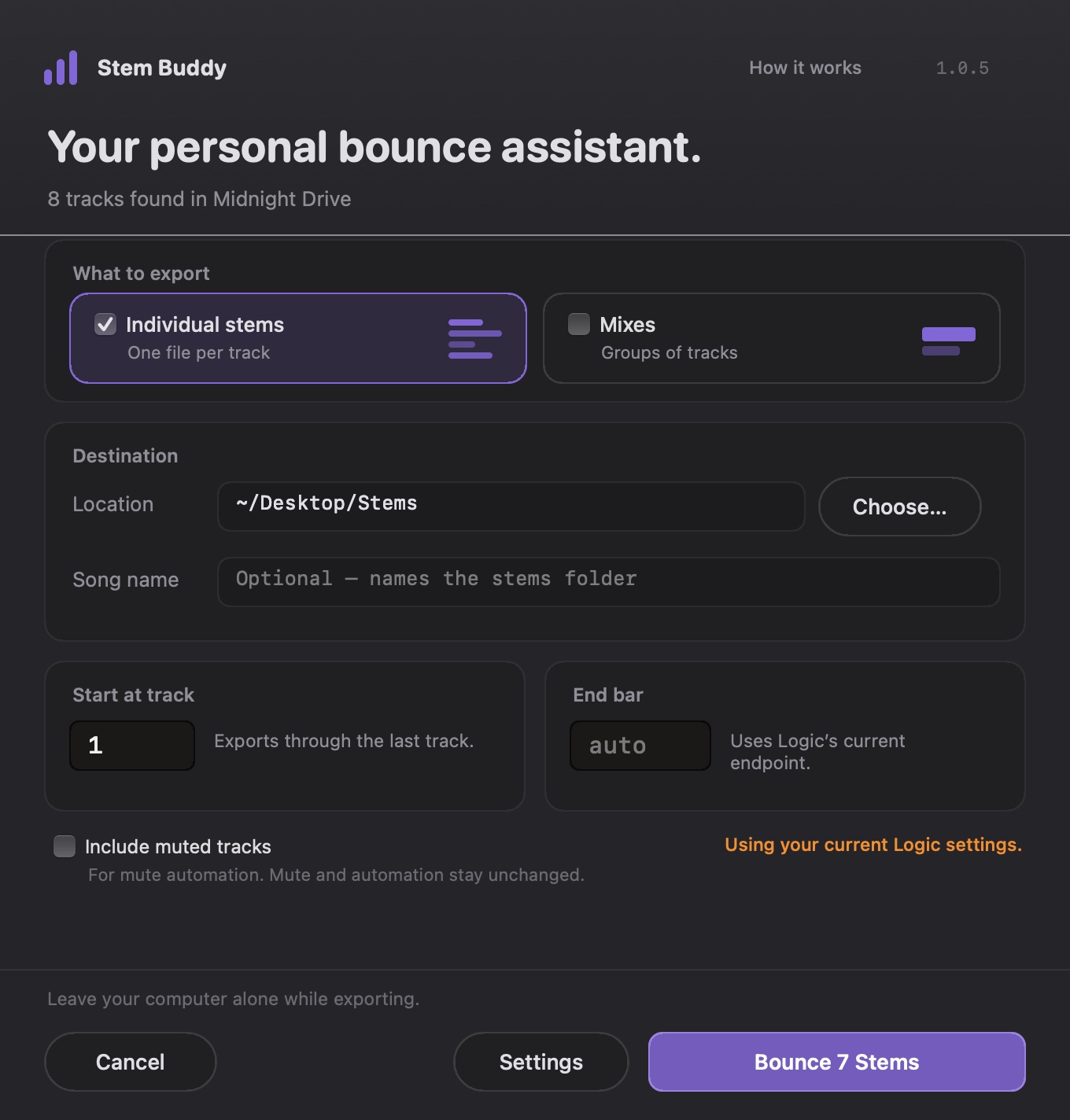
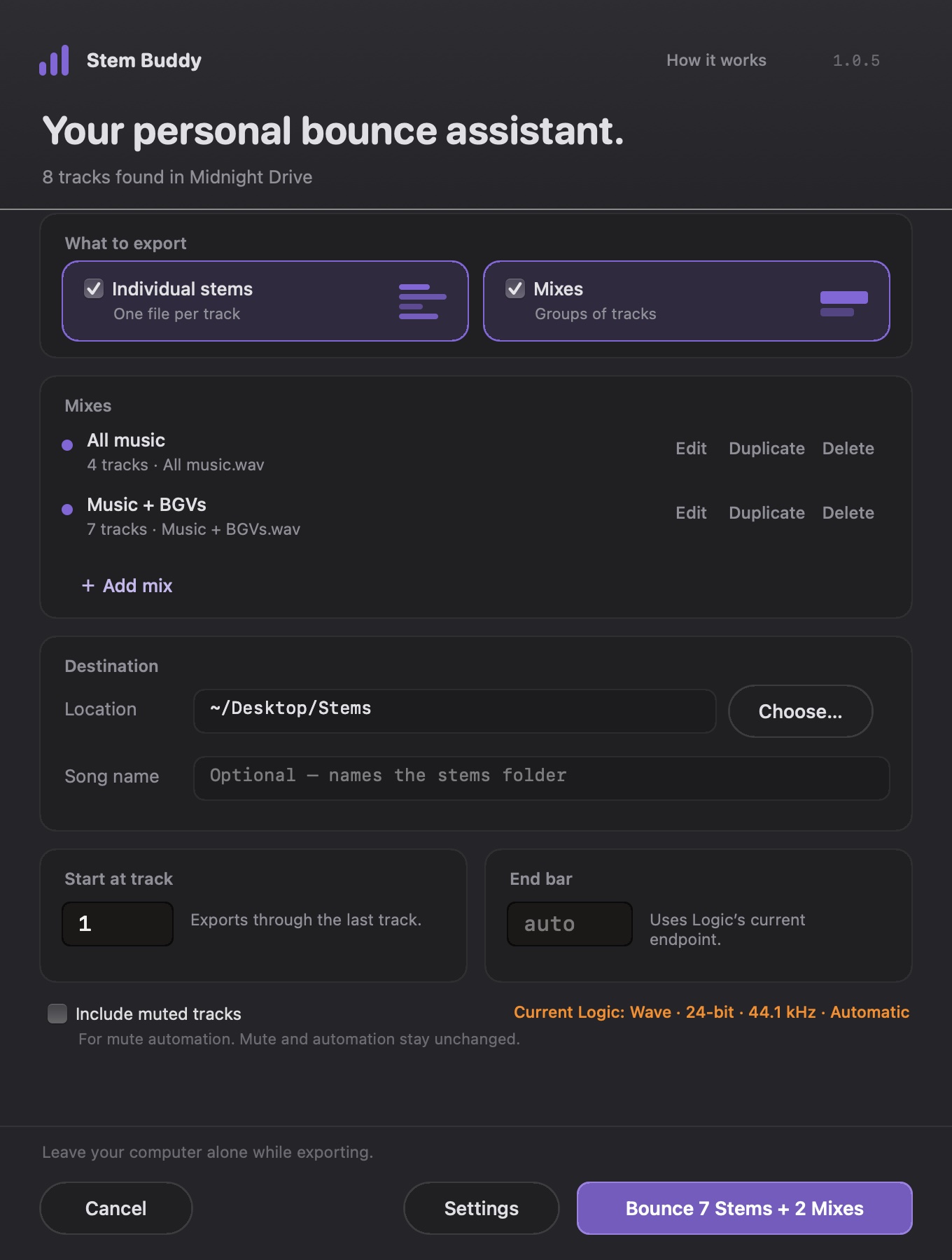
Name a mix, tick its tracks, done. Stem Buddy solos exactly those tracks and Logic renders them with your routing and plug-ins, the same way it does when you solo them and bounce by hand.
Stem Buddy remembers your mixes for each project, and they bounce right after your stems in the same run.
Stem Buddy works the way you already bounce in Logic, just without you sitting there.
One WAV per track, named after the track, all in one Song - Stems folder. Start from any track and end at any bar.
Group tracks into named mixes, like All music or Music without drums. They bounce right after your stems, and Stem Buddy remembers them per project.
A Mac notification, plus an optional text (iMessage) or email, so you can leave the room.
Every file gets its own name: a mix called Bass becomes Bass (2).wav next to your Bass.wav stem. Existing files are never replaced.
Before each bounce it confirms exactly the right tracks are soloed. After, it checks the WAV is complete before moving on.
Cancel finishes the current file first. Resume checks your finished files and carries on from the next track or mix.
Muted tracks are skipped by default. Tick Include muted tracks to bounce them too, without changing a single mute.
It never edits your mutes or automation and never saves your project, and it clears its Solo when it finishes.
Stem Buddy checks for updates and installs them in a few seconds when you say so, keeping its macOS permissions.
A long session takes as long as Logic needs to render it, and none of that time needs you. Stem Buddy pings your Mac when it’s done and, if you like, texts or emails you too.
Both are optional. Texts go out through Messages on your own Mac; emails come from Stem Buddy’s alert address. They only say how the export ended and how many files, never song or track names.
Stem Buddy moves from one bounce to the next in seconds, so the export takes about as long as Logic needs to render.
In our test, a whole 10-track export took 3 minutes 16 seconds from click to finish, every file checked. Bouncrrr took almost 9 minutes on the same project and Mac.
| Measurement | Stem Buddy | Bouncrrr |
|---|---|---|
| Click to first bounce | 16.2 s | 70.0 s |
| Median time from one bounce starting to the next | 17.1 s | 48.5 s |
| Whole export, 10 tracks | 3 min 16 s | 8 min 44 s |
One observed export of all 10 tracks, including muted ones, of the same Logic project (bars 1–8) with each app on the same Intel MacBook Pro (Core i9), macOS 14, Logic Pro 11.0.1, both set to WAV 24-bit, 44.1 kHz, Offline, audio tail on. Stem Buddy was timed from its own log and a screen recording; Bouncrrr from a screen recording at quarter-second resolution to the moment Logic’s bounce progress appears, on an earlier day. Bouncrrr paused once to ask about a click setting (55.8 s to its first bounce without that pause), and its output files weren’t kept, so this compares how long each took, not the files themselves. Times vary with session length, track count and your Mac.
No subscription and no monthly meter running while you work. Buy Stem Buddy once and keep using it.
Tested so far on an Intel Mac with macOS 14 and Logic Pro 11.
Yes. Download Stem Buddy and use every feature free for 7 days, starting from your first bounce. Just your email: no account and no card. When you buy, you get a licence key that unlocks it for good.
No. You pay once and keep it, with free updates for every 1.x version. The launch price is $50 for the first 30 days, then $75.
Yes. If Stem Buddy isn’t right for you, email us within 14 days of buying for a full refund, no questions asked. See the refund policy.
Yes. You get a Mac notification, and you can also have Stem Buddy text you over iMessage or email you (Stem Buddy menu › Done Alerts…). Texts are sent by Messages on your own Mac; emails come from Stem Buddy’s alert address. Both only say how the export ended and how many files were made.
Stem Buddy checks for updates about once a day and asks before installing. Updates are signed, take a few seconds, and keep Stem Buddy’s macOS permissions, so there’s nothing to set up again. You can also choose Stem Buddy menu › Check for Updates….
It does what you’d do by hand: selects tracks, solos them, sets the bounce range and runs Logic’s Bounce. It never edits your mutes or automation and never saves your project, and it clears its Solo when it finishes.
Logic does all the rendering with your routing and plug-ins. Stem Buddy only chooses which tracks are soloed, so each mix sounds the way it does when you solo those tracks and bounce by hand.
Not during the export. Stem Buddy works Logic’s windows for you, so leave the mouse and keyboard alone. If it notices Logic lose focus or the session change, it stops and tells you what needs attention, and you can resume later.
They’re skipped by default, so old takes don’t clutter your folder. Tick Include muted tracks if you rely on mute automation; Stem Buddy bounces them without changing a single mute.
No. Your audio and your projects never leave your Mac, and there’s no account. A licence key is checked with our store when you enter it, then about once a day. Stem Buddy sends usage statistics (how many files were bounced, how long it took, the app version and a random ID for your installation). It also checks the Stem Buddy website for updates. They’re on by default, and you can turn them off in the Stem Buddy menu.
macOS requires them for any app that operates another app. The Connect to Logic screen walks you through both in System Settings.
Download Stem Buddy, open your Logic session and bounce. If it saves you time, buy it once: $50 for the first 30 days after launch, then $75.
For Logic Pro on Mac. The download is about 3 MB.